⭐ Best Option: RoboForex Copy-Trading
For the most accurate trade synchronization — lowest latency, best execution — we recommend opening a RoboForex MT5 ECN account and subscribing through their built-in copy-trading platform.
- ✅ Lowest slippage
- ✅ Proportional lot sizing
- ✅ Instant sync — no delay
- ✅ Free to use
A Subscribe via RoboForex (Recommended)
Open a RoboForex MT5 ECN Account
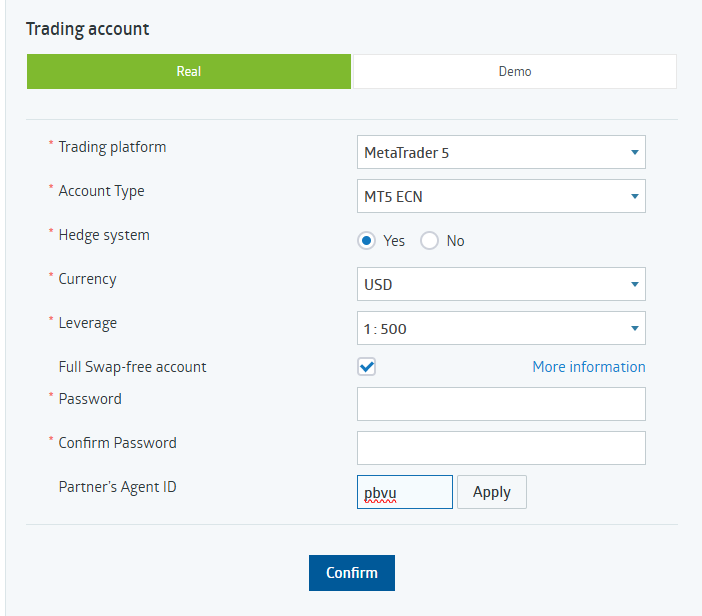
Register at RoboForex using our partner link and open a Real MT5 ECN account. Make sure to enter Partner Agent ID pbvu when registering so your account is correctly linked.
Configure Your Account Settings
During registration, use these exact settings for best performance:
- Trading Platform: MetaTrader 5
- Account Type: MT5 ECN
- Hedge System: Yes
- Currency: USD
- Leverage: 1:500
- Full Swap-free: ✓ Checked
- Partner's Agent ID: pbvu → click Apply
Subscribe via RoboForex Copy-Trading
Once your account is funded, go to the RoboForex copy-trading page and subscribe to the Neurowick signal:
Configure Copy Settings
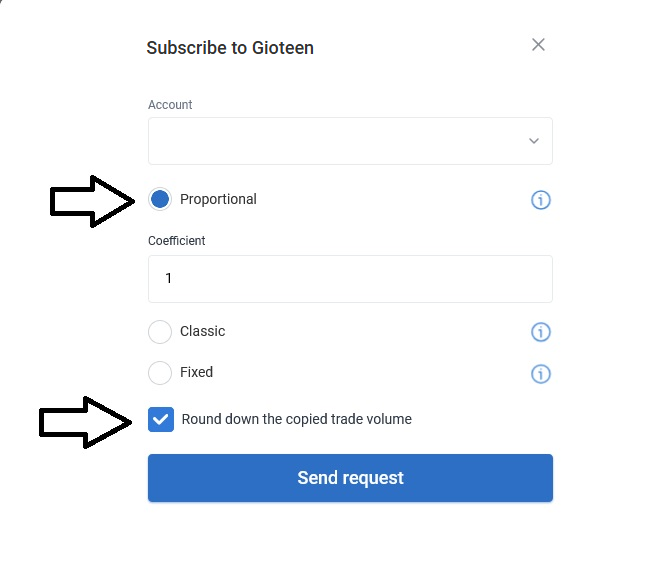
In the subscription dialog, use these settings for optimal copying:
- Method: Proportional (scales trades to your account size)
- Coefficient: 1
- Round down the copied trade volume: ✓ Checked
Then click Send Request.
🔗 Alternative: Any MT5 Broker via MQL5
If you already have an MT5 account with a different broker, you can subscribe to the Neurowick signal through the MQL5 signals marketplace. This works with any MT5-compatible broker, but execution speed may vary depending on your broker's conditions.
B Subscribe via MQL5 (Any Broker)
Open the MQL5 Signal Page
Go to mql5.com/en/signals/2359316 and click Subscribe. You'll need a free MQL5 account.
Connect Your MT5 Terminal
In MetaTrader 5, go to Tools → Options → Community, log in with your MQL5 account. The signal will start copying automatically.
Configure Sync Settings
In MT5 under Signals tab, set copying to Proportional and set your risk percentage. We recommend starting with the same ratio as the signal.
Track every trade, profit, and position live on our signal dashboard:
📈 View Live Neurowick Dashboard